Reduce clinical mental overload
Several AI chats open, a different answer in each, and you're still second-guessing?
One case. One structured second look.
Reference support for qualified healthcare professionals · Does not diagnose or treat · Not a medical device
Why clinicians use it
The parts of the job that weigh on you.
Do you find yourself second-guessing a case long after the shift ends?

Ever seen a case before, but can't remember which patient it was?

Are notes and letters piling up at the end of the day?

Is it hard to know whether the guideline you remember is still current?

Ever paused before a dose, unsure about kidney function, the label or an interaction?
What a second look does
What would a trusted colleague do with this case?
It asks. It weighs. It drafts. It remembers.
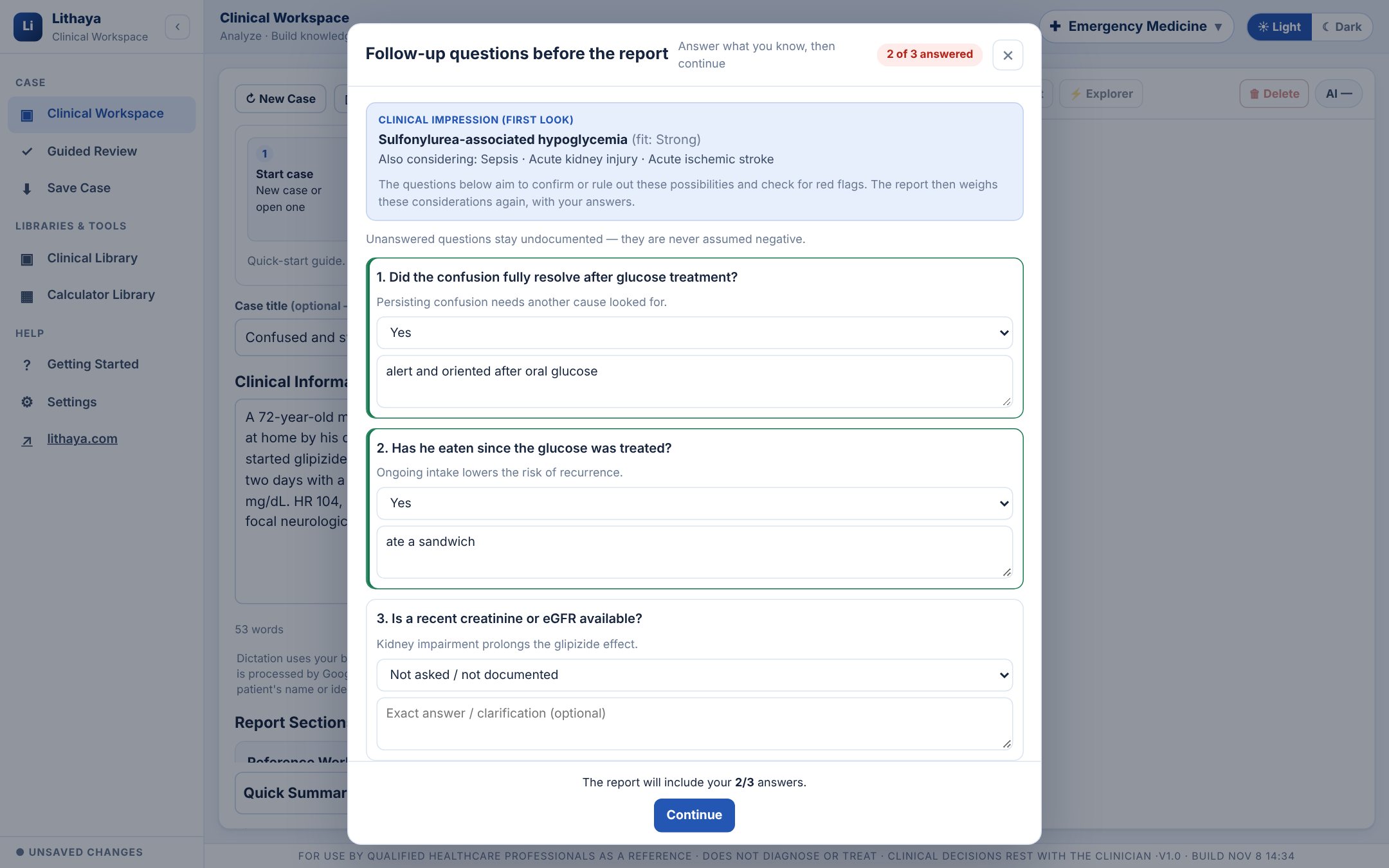
Before every Full Report, the questions the history left open.
A first look at the case finds the details that would confirm or rule out the main possibilities, or reveal a red flag, each with the reason it matters. Answer what you know and select Continue. Unanswered questions are never assumed negative.
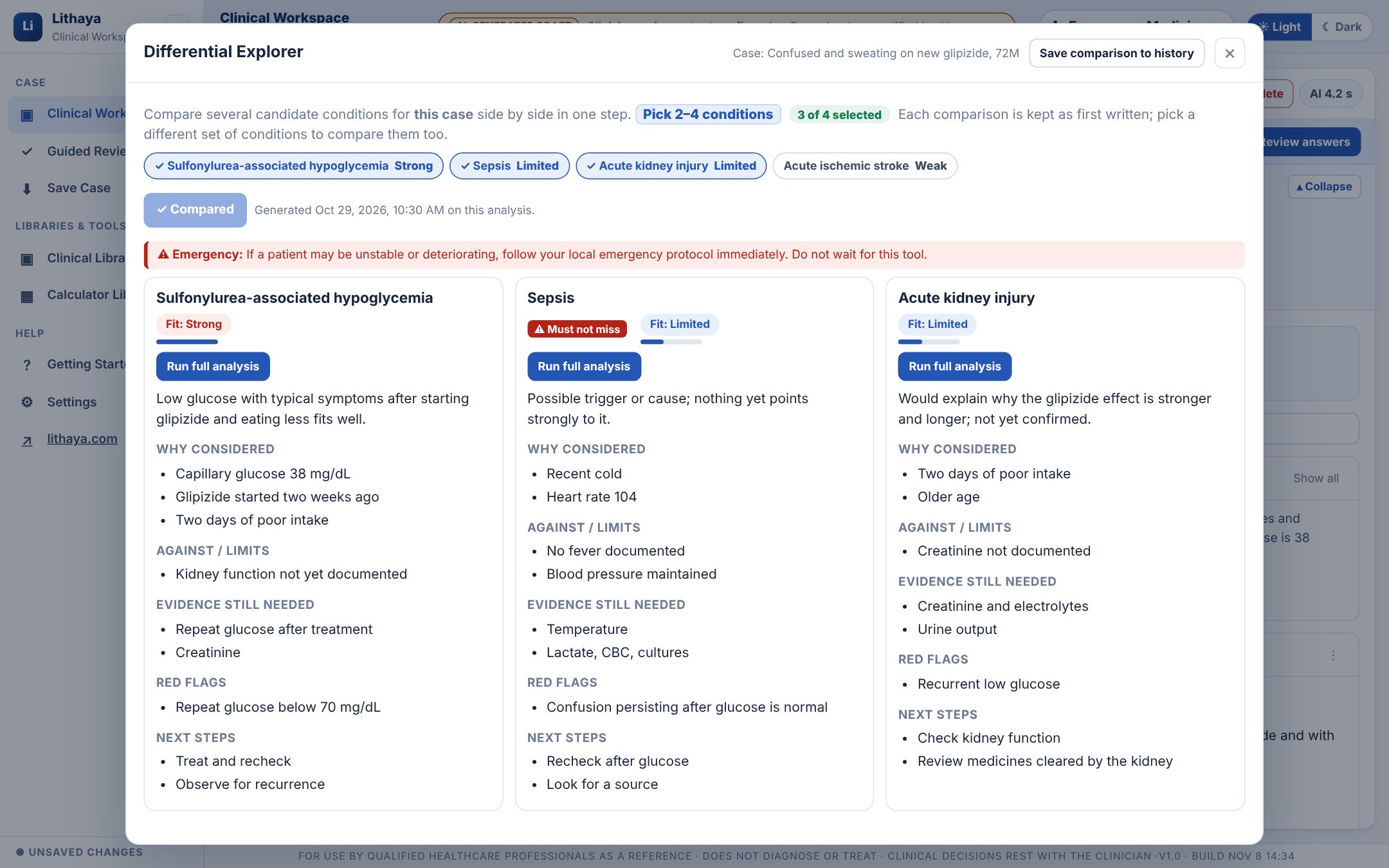
A Clinical Impression and a Differential Diagnosis that show their reasoning.
Each condition has its fit with the case, what in this case supports it and argues against it, and what tells it apart. Conditions where a delay could cause serious harm are marked “Must not miss”, however limited their fit. Put two to four side by side in the Differential Explorer.
The report and the paperwork, drafted from the same case.
Choose the sections you need: tests to consider, red flags, medication reference with the FDA label check, a SOAP note, a referral letter, patient education. Every page is labeled as an AI-generated draft, and you confirm your review before anything is copied, printed or exported.
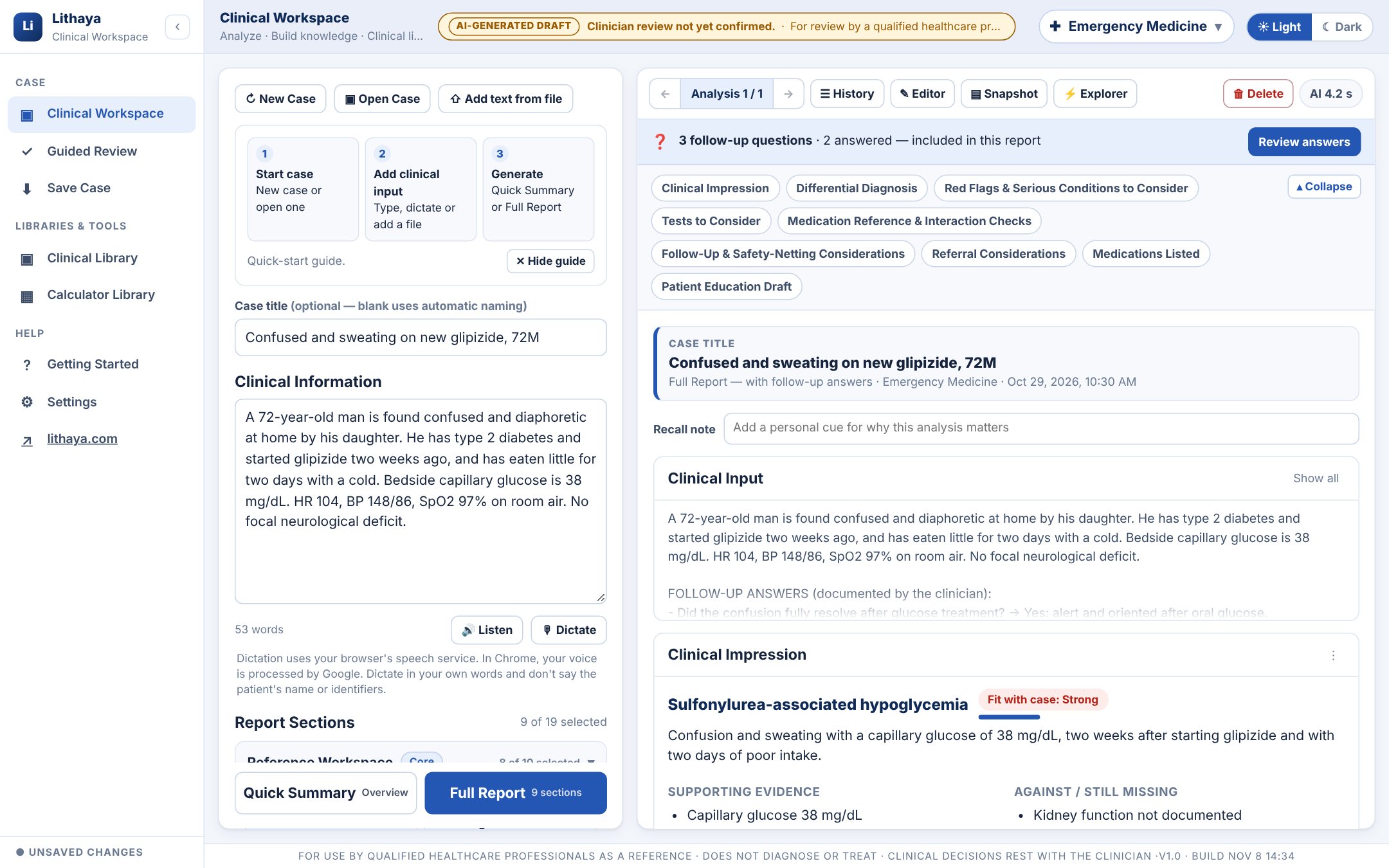
Every case you've reasoned through, one search away.
Each saved case keeps its reports, your edits, the follow-up answers and a recall note, in a Lithaya folder on your own computer or drive. Search inside every report, or find every case where a condition was the impression or in the differential.
Your day
Is there ever enough time left at the end of the day?
Your day, with less to carry.
The same case, from the first look to the last note. Choose your role.

- Before clinic
Pick up where you left off
Search your library for last week's patient and reopen the case with its reports, your edits and your recall note.
- During the visit
A second look while the case is fresh
Type or dictate a few lines. Answer the questions the history left open, then read the differential with what supports and argues against each condition.
- After the visit
The letter, already drafted
A referral letter and SOAP note from the same case, with “Check before signing” notes, for you to edit and sign.
- End of day
Nothing left to hold in your head
Save the case with a recall note. It is one search away, on any computer where you keep your Lithaya folder.
- Start of shift
Know what to watch for
Red flags and the conditions marked “Must not miss” are listed for each case, so you know what would need escalating.
- Before a dose
“Before you give”
Allergies, weight for per-kilogram doses, kidney and liver function and the interactions the labels mention, each marked ✓ or Check.
- With the patient
Patient education, drafted
Plain-language patient education written from the case, for you to review and adapt before you share it.
- End of shift
Notes without the blank page
Progress notes and discharge summaries drafted from the same case, ready for you to edit.
- Checking an order
The label, already looked up
Each medicine checked against its FDA label: maximum daily dose, kidney and liver adjustments, boxed warning and contraindications, linked to DailyMed.
- Dosing
Calculators at hand
27 clinical calculators in the Calculator Library, creatinine clearance (Cockcroft-Gault) among them.
- Before it goes out
Flags you can act on
A dose above the label's maximum, or a documented allergy the label mentions, is flagged for you to check.
- End of day
Your cases, kept
Save the case in your own library, searchable by medicine or by any word in its reports.

- Before class
Pick your track
Nursing, Pharmacy or Medical Trainee in Lithaya Academy, with stations written for the way each profession thinks.
- Practice
Answer first
Work through a fictional case station by station: priorities, assessment, escalation, drug therapy problems, differentials and plans.
- Feedback
See what you missed, and why
Marks, what to add and a model answer after each station, with the case's answer at the end.
- Exam week
Assessment mode
All the feedback at the end, like an exam. Export your progress to keep a copy.
Three products, one way of working
Do you need everything, or just the part that fits your day?
Choose the part that fits how you work.
Clinical Workspace
The full reference report: follow-up questions first, then 19 sections you choose, with the Differential Explorer, Clinical Snapshot, calculators and your own case libraries, searchable by anything in their reports.
Guided Review
A shorter path through one case: enter what you have, answer the follow-up questions first, select Continue for the analysis, and see exactly what later answers changed.
Lithaya Academy
Clinical-reasoning practice for nursing, pharmacy and medical trainees, on fictional cases, with marked feedback, a model answer and the case's answer at the end.
How a case moves through Lithaya
Only a few lines of history and ten minutes before the next patient?
From a few lines of history to a draft you can review.
Built around clinical judgment
Worried a tool will try to decide for you?
What Lithaya does, and what it leaves to you.
It organizes
You decide
Identifiers are removed before anything is sent, your cases are not used to train AI, and your library stays in your own folder. How your information is handled
Will it work on the cases you see?

